History
A couple of weeks ago, I got a ticket regarding performance score. I need to improve performance score of Lighthouse score, especially on mobile screen. Since that day, a lot of code changes have been made to improve the performance score. Our initial score was around 43. Much code has been refactored to improve the scores, by eliminating duplicate/redundant code, changing base layout, tree shaking, etc, but those works still don’t improve the score at all, and I’m stuck at that point.
Identify the Problems
I & my colleague assume this issue is related to the structure of project & the architecture. Since this project contains legacy code from previous developer, I cannot change code at will & I don’t want to mess up the current flow. If it works, don’t touch it, keep it working. So I and my colleague agreed to focus this task on restructuring a few things.
Messiah
While fixing this issue, I accidentally found a plugin (Capo: Chrome extension). This plugin helps to order the elements in <head>, which elements have an impact on performance. This plugin helps me to identify the issue just by ordering elements in the <head> correctly. Me and my colleague I tried to tidy & reorder the mess of <head> elements, and here is the result:
Capo recommendation structure
| Before | After |
|---|---|
 |  |
Lighthouse score
| Before | After |
|---|---|
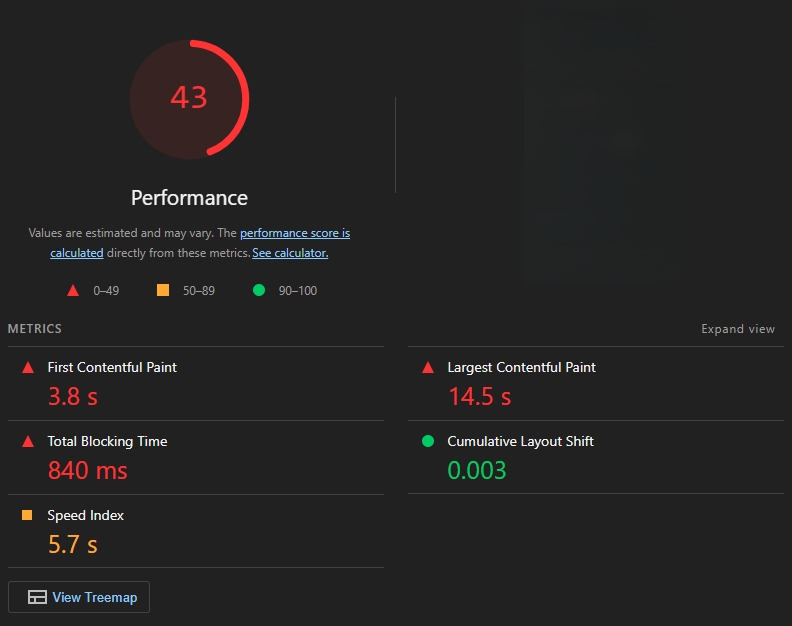 | 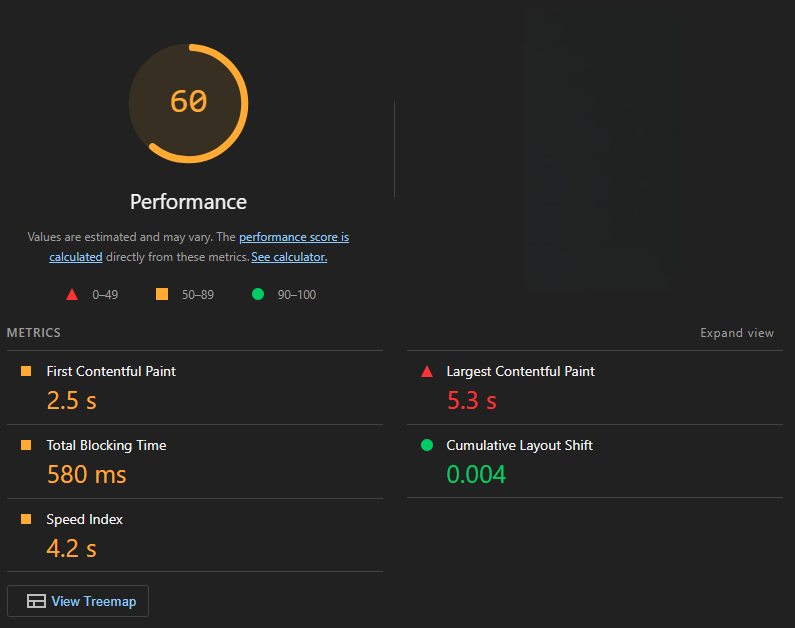 |
And yes, improved, score now around 60 from 43, just by sorting the structure of the element position only.
HTML example before Capo optimized
<head>
  <title>My Website</title>
  <meta charset="utf-8" />
  <meta http-equiv="X-UA-Compatible" content="IE=edge" />
  <meta name="description" content="blabala" />
  <meta name="viewport" content="width=device-width, initial-scale=1" />
  <meta name="format-detection" content="telephone=no" />

  <script defer src="/assets/js/scipts-1.js"></script>
  <script defer src="/assets/js/scipts-2.js"></script>

  <link
    rel="preload"
    href="/assets/fonts/font-1.woff2"
    as="font"
    type="font/woff2"
    crossorigin
  />
  <link
    rel="preload"
    href="/assets/fonts/font-2.woff2"
    as="font"
    type="font/woff2"
    crossorigin
  />
  <link
    rel="preload"
    href="/assets/fonts/font-3.woff2"
    as="font"
    type="font/woff2"
    crossorigin
  />

  <link rel="preload" href="/css/style.css" as="style" />
  <link href="/css/style.css" rel="stylesheet" />

  <link rel="apple-touch-icon" sizes="180x180" href="/apple-touch-icon.png" />
  <link rel="icon" type="image/png" sizes="16x16" href="/favicon-16x16.png" />
  <link rel="icon" type="image/png" sizes="32x32" href="/favicon-32x32.png" />
</head>
HTML result after Capo optimized
<head>
  <meta charset="utf-8" />
  <meta name="viewport" content="width=device-width, initial-scale=1" />
  <title>My Website</title>

  <link href="/css/style.css" rel="stylesheet" />

  <link
    rel="preload"
    href="/assets/fonts/font-1.woff2"
    as="font"
    type="font/woff2"
    crossorigin
  />
  <link
    rel="preload"
    href="/assets/fonts/font-2.woff2"
    as="font"
    type="font/woff2"
    crossorigin
  />
  <link
    rel="preload"
    href="/assets/fonts/font-3.woff2"
    as="font"
    type="font/woff2"
    crossorigin
  />

  <script defer src="/assets/js/scipts-1.js"></script>
  <script defer src="/assets/js/scipts-2.js"></script>

  <meta name="description" content="blabala" />
  <meta name="format-detection" content="telephone=no" />
  <link rel="apple-touch-icon" sizes="180x180" href="/apple-touch-icon.png" />
  <link rel="icon" type="image/png" sizes="16x16" href="/favicon-16x16.png" />
  <link rel="icon" type="image/png" sizes="32x32" href="/favicon-32x32.png" />
</head>
The conclusion is that positions matter. Remember, just sorting, sorting only, nothing else…. Big thumbs 👍 for this creator of the plugin, you helped me to closed my Jira ticket. For more detailed information, you can read it in full on their Capo: Github.